 Arova
Smart Guest Home
Reading an ordinary water meter with a camera, and seeing what each stay costs
An ordinary water meter has no connection to anything. It tells you how much water went through it, but not who used it or when, so a stay's water usually disappears into a monthly bill. Arova reads the meter with a small camera, with no plumbing work and no new meter, and puts each stay's water and its cost in the stay report.
In short
- A Raspberry Pi with a camera photographs the meter every few minutes, with a small LED lamp that comes on only for the photo.
- You show Arova where to look by dragging boxes on the photo with the mouse: one around the digit wheels, one around each red-pointer dial.
- Each photo goes through up to three steps: check whether the dials moved since the last confirmed reading, read it on the Pi if they did, and ask a visual AI only if that reading doesn't add up.
- You see the results: a graph with your stays on it, a log of every reading, and the water and its cost for each stay, between the guest's real arrival and departure.
1. The camera and the lamp
You need a Raspberry Pi with a Camera Module 3, a small USB LED lamp, and Wi-Fi at the meter. Nothing touches the water: the camera only looks at the dial, so the meter's lid just has to stay open.
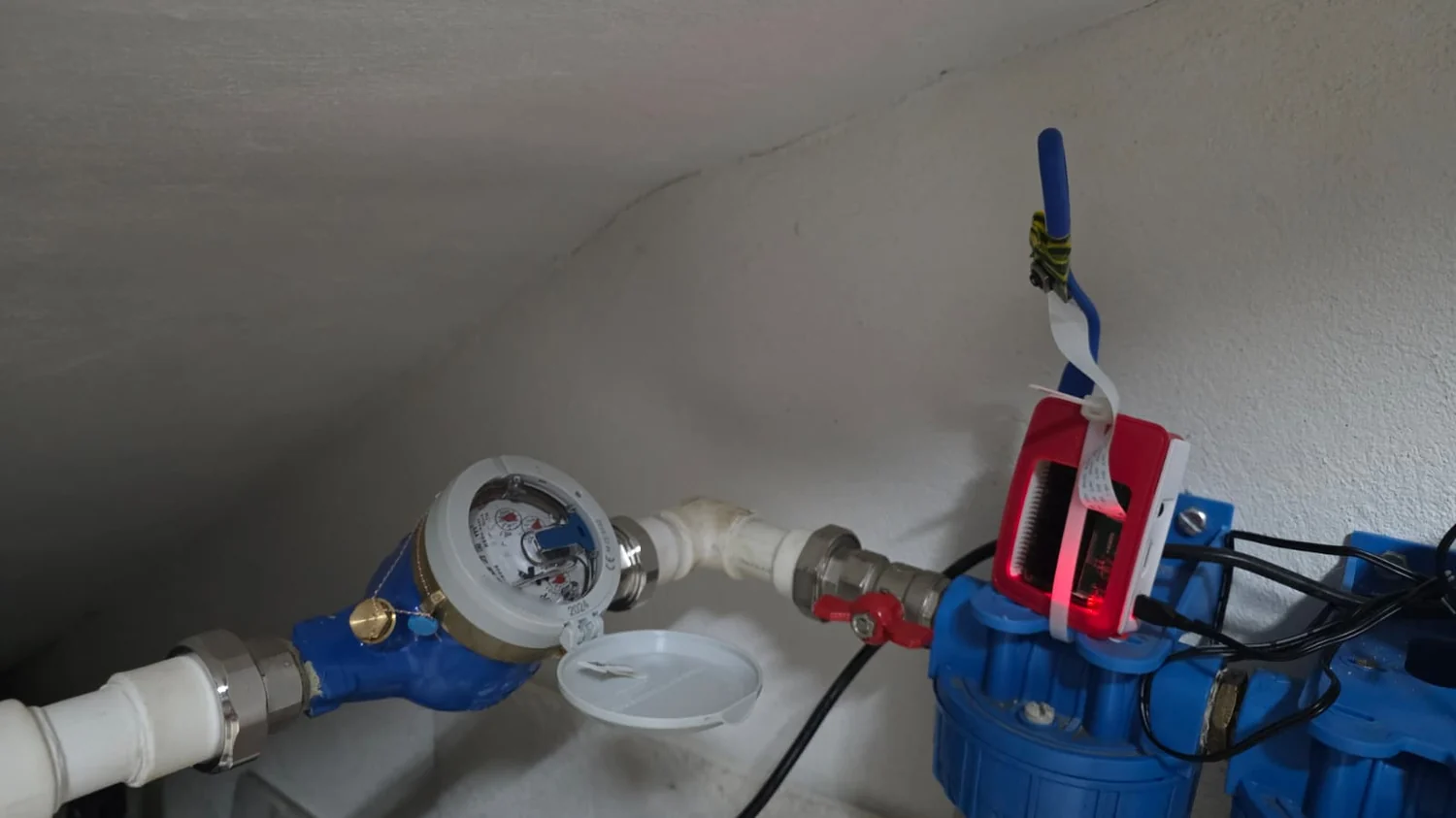
There wasn't room to bring the camera closer, so the digits are small in the picture. That's why the Pi takes its photos at the camera's full resolution, 4608 × 2592: at half that size, the reader kept losing digits.
The LED lamp matters because a meter usually sits somewhere dark, and the same light on every photo makes them comparable. The Pi powers its USB ports only when it needs to: the lamp comes on a few seconds before each photo and goes off straight after. The lamp is close and the dial is white, so the photos are also taken slightly darker than the camera's automatic setting. In our tests that removed the burnt-out white around the digits without losing sharpness, while longer exposures read worse.
2. Marking the wheels and dials with the mouse
Open Property → Smart Guest Home → Meters → Water, then Set up the meter camera, and pair the Pi with its key. The latest photo appears, and you do the rest on it:
- Turn the photo upright with the ⟲ / ⟳ buttons. It turns at once, so you can find the angle and practise before the next photo arrives.
- Choose Digit wheels and drag a box around the wheels with the mouse.
- If the meter has red-pointer dials for the litres, choose a dial's button, such as ×0,1, using the factor printed beside the dial, and drag a box around it. Repeat for the others.
- Enter the rest: how many wheels, how many are after the comma, the minutes between photos, the meter's largest flow and the price per m³. Then Save.
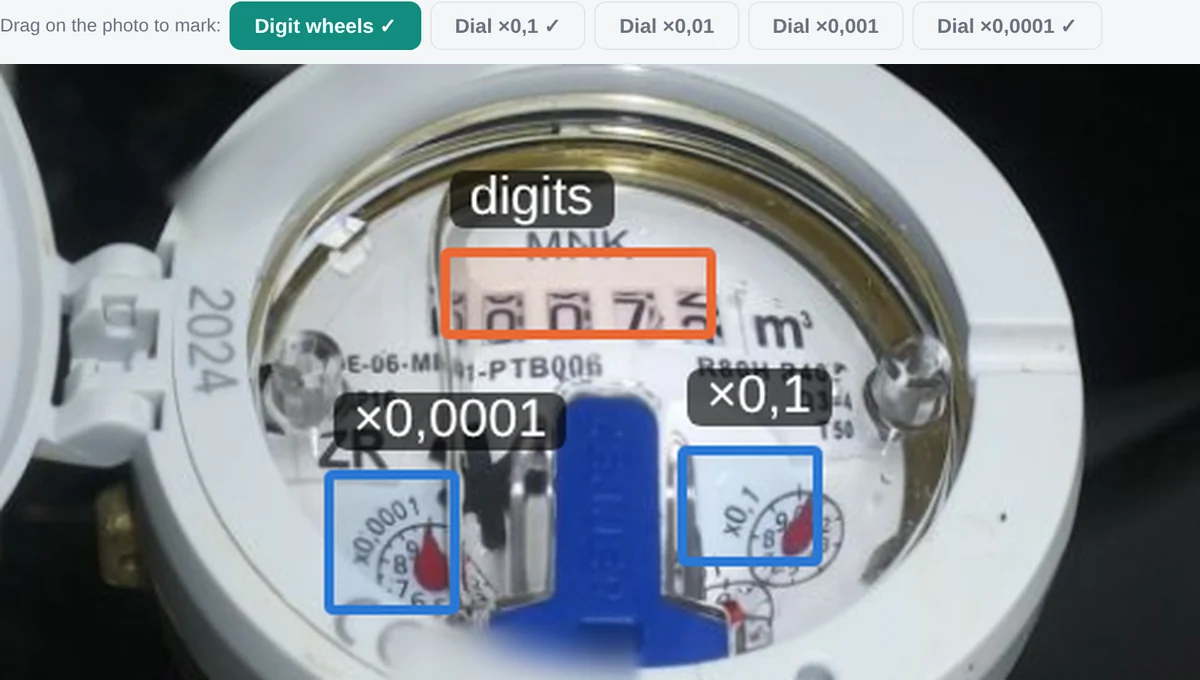
The reading is then the wheels plus the dials. Keep the digit box snug around the wheels you chose. If it catches a slice of a neighbouring wheel, the reader can see that slice as an extra digit.
3. How a photo becomes a reading
The hard part is a wheel caught between two numbers. It shows the bottom of one and the top of the next, and if the water stops at that moment, it stays that way. So each photo goes through the cheapest step that can settle it.
Step 1: did the dials move?
The Pi measures where each red pointer sits and compares that with the last confirmed reading. The finest dial makes a full turn for each litre, so any real use moves it. Comparing pointers rather than pixels matters: a camera mount can slowly shift by a few pixels, which makes two photos of a still meter look different pixel by pixel, but the pointer's position is measured from its own pivot. If the pointers haven't moved, the value stays, and nothing else runs. This should be the outcome most of the time in an empty house. A full read still runs every 6 hours as a safety check.
Step 2: reading on the Pi
If the picture changed, the Pi reads the digits itself with an open-source text recogniser, so this costs nothing. Red-pointer dials are read from the angle of the pointer. Arova then checks the result: the right number of digits, not lower than the last reading, and no more than the meter's largest flow allows since then.
The dial also settles a half-turned wheel. The last wheel moves on as the first dial passes 0, so while that dial is near 0, Arova doesn't rely on that wheel's digit. It works the value out from the last reading and the dial instead.
Step 3: asking a visual AI
This general-purpose recogniser doesn't know it's looking at a meter, and on a difficult photo it can return letters or a wrong digit. So if the reading is refused, doesn't match the value, is the very first, or jumps a whole m³ or more, Arova sends the small picture of the digits to a low-cost vision model, along with the last reading for context. Each question costs a fraction of a cent, and only that picture of the digits is sent.
The AI can misread too, so its answer goes through the same checks, and it can't push a big change through alone: a first reading or a jump of 1 m³ or more is only believed when the Pi and the AI read the same digits. Otherwise the reading is refused and shown to you, and you can use Use this reading if the meter is new or a wrong value got stuck.
4. The readings log
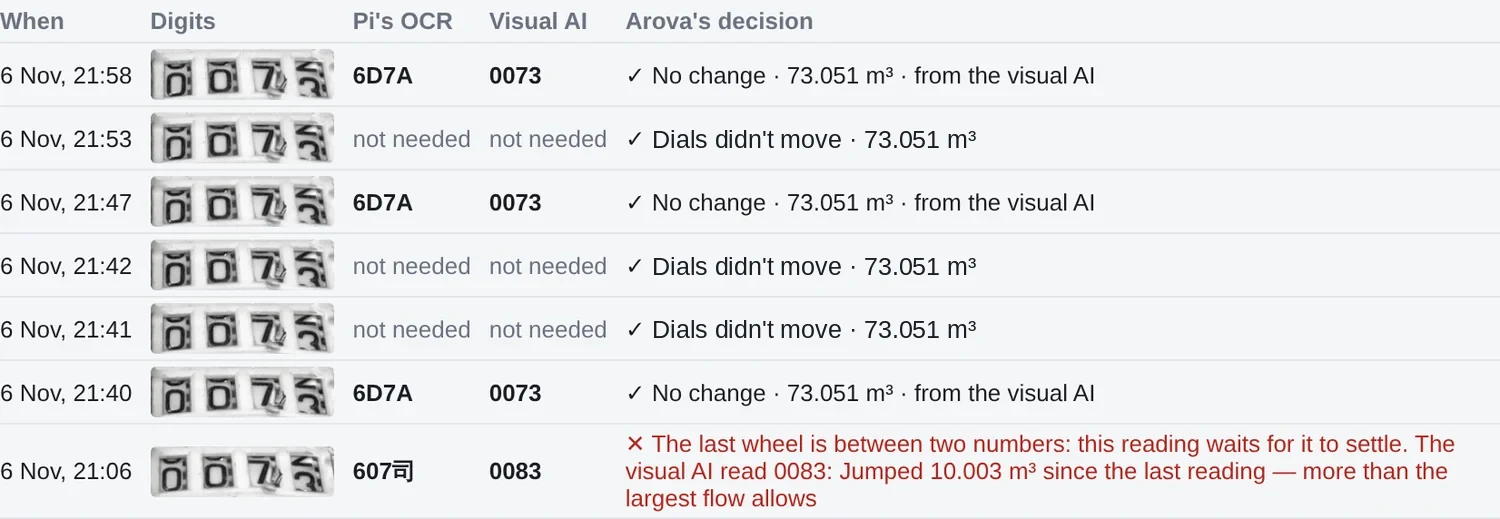
You never have to take this on trust. In Set up the meter camera, the log has one line for every photo, kept for 14 days: the digits (click for the whole photo), what the Pi read, what the AI read if it was asked, and Arova's decision. Above it, a running count shows how many readings each step resolved, and what the AI has cost.
5. The results: what each stay cost
In Meters → Water you see the water used by the hour, day or week, with the stays marked on the graph, the total and its cost at your price per m³.
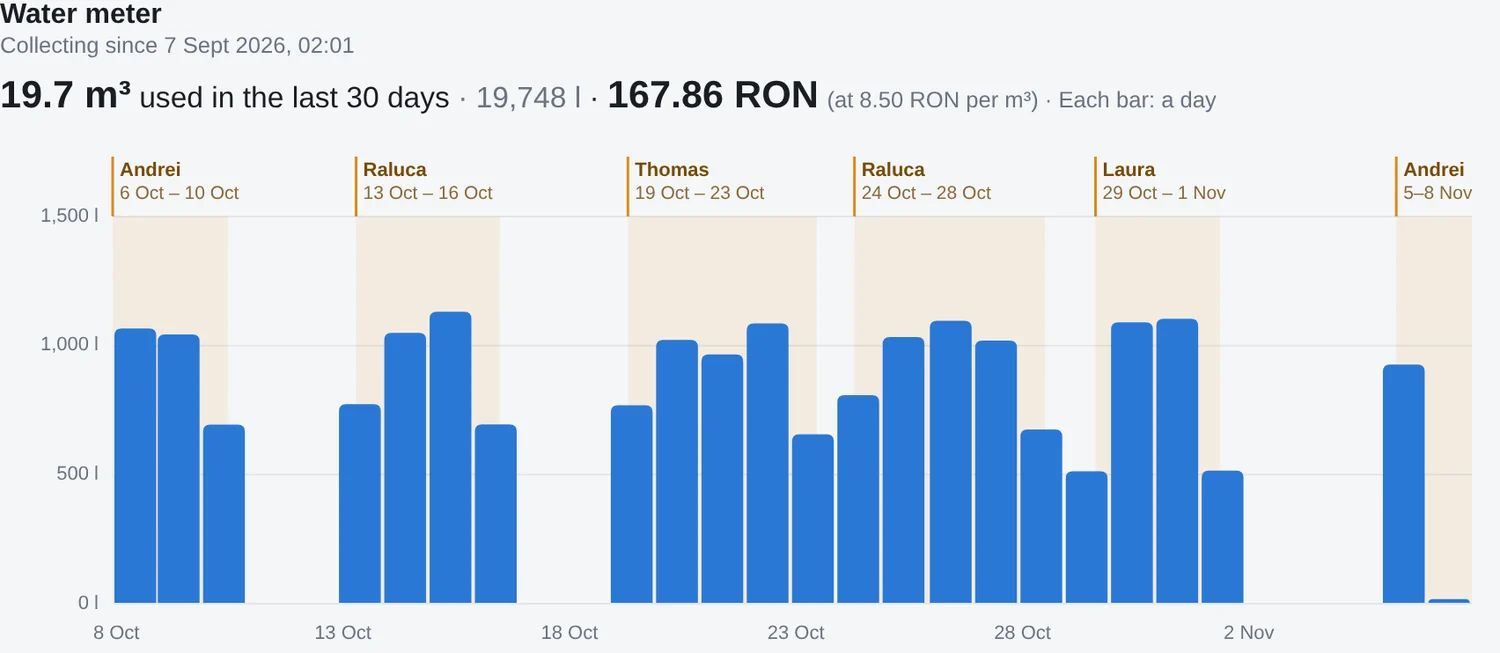
The stay report goes further. Its water covers the guest's real stay: from their arrival, for example when they opened the key box with their PIN, until they left. If Arova has no arrival or departure for the stay, it uses the Smart Guest Home access period instead. Water used before they arrived or after they left, such as by the cleaning team, doesn't count against the stay.
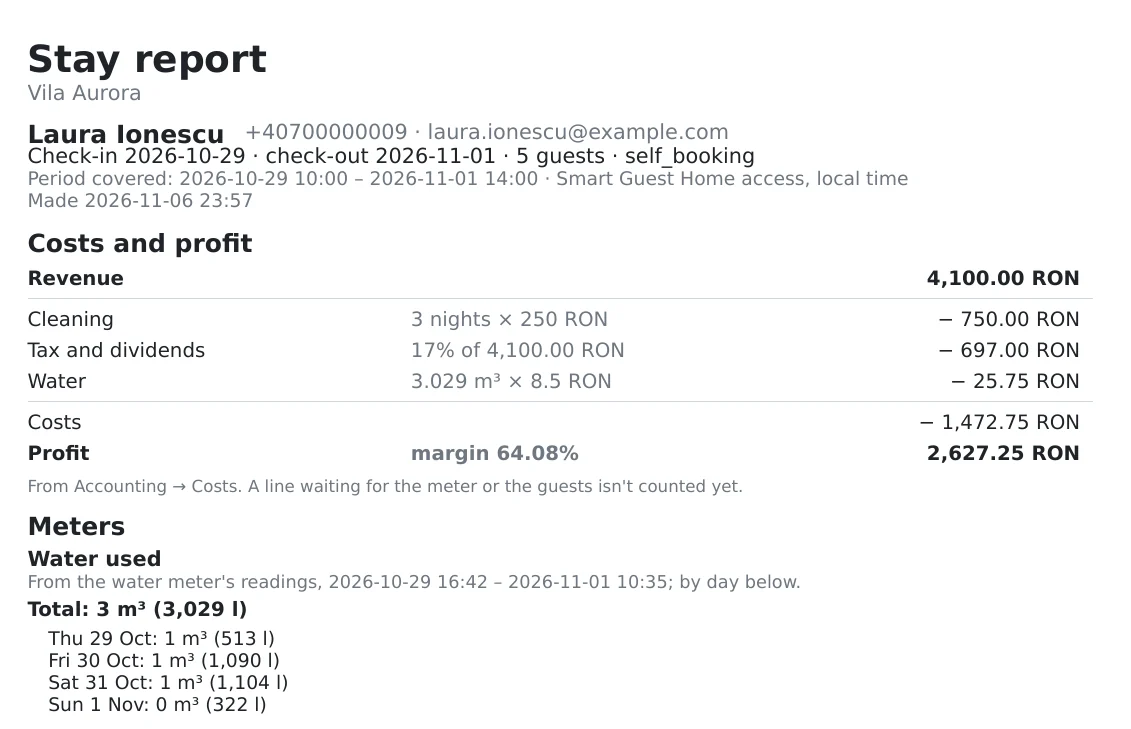
So the water becomes one more line in the stay's Costs and profit, beside cleaning and tax, and it's counted in Accounting → Profitability too. The report's total also breaks down day by day, which helps you spot a leak or a very heavy stay. Stays that began before the meter's first reading don't get a water line.
Questions
Does it need a new meter, or a plumber?
No. The camera only looks at your existing meter. The lid has to stay open, and the camera needs a clear view of the dial.
What if the Pi goes offline?
Its readings stop until it's back. The next reading shows the water used in the meantime, and the flow limit grows with the time since the last reading to allow for that. A very large jump still needs the Pi and the AI to agree.
How often does it use the AI?
Only when the Pi's reading doesn't add up. While no water runs, the dial check means it's barely asked at all. The running count in the set-up shows how often it was asked and what it cost.
Does the photo leave the house?
The Pi sends each photo to your Arova account, for the log and the set-up. Only the small picture of the digits goes to the AI provider, and only when the AI is asked.
Can it read a meter with only digit wheels?
Yes, the dials are optional. Without them, the reading has no finer steps than the wheels, and there's no dial to settle a half-turned wheel.
For the reference version of every option, see Meters in the Arova manual.